
The Science of Document Conversion: How In-Browser PDF to Word Parsing Preserves Layouts & Protects Privacy
Published on 27 Agustus 2026
In modern office workflows, academic environments, and legal practices, converting documents between PDF, Word (DOCX), and Image formats is an everyday necessity. Whether editing an invoice, revising a business contract, or filling out a scanned form, users frequently encounter the limits of read-only PDF files.
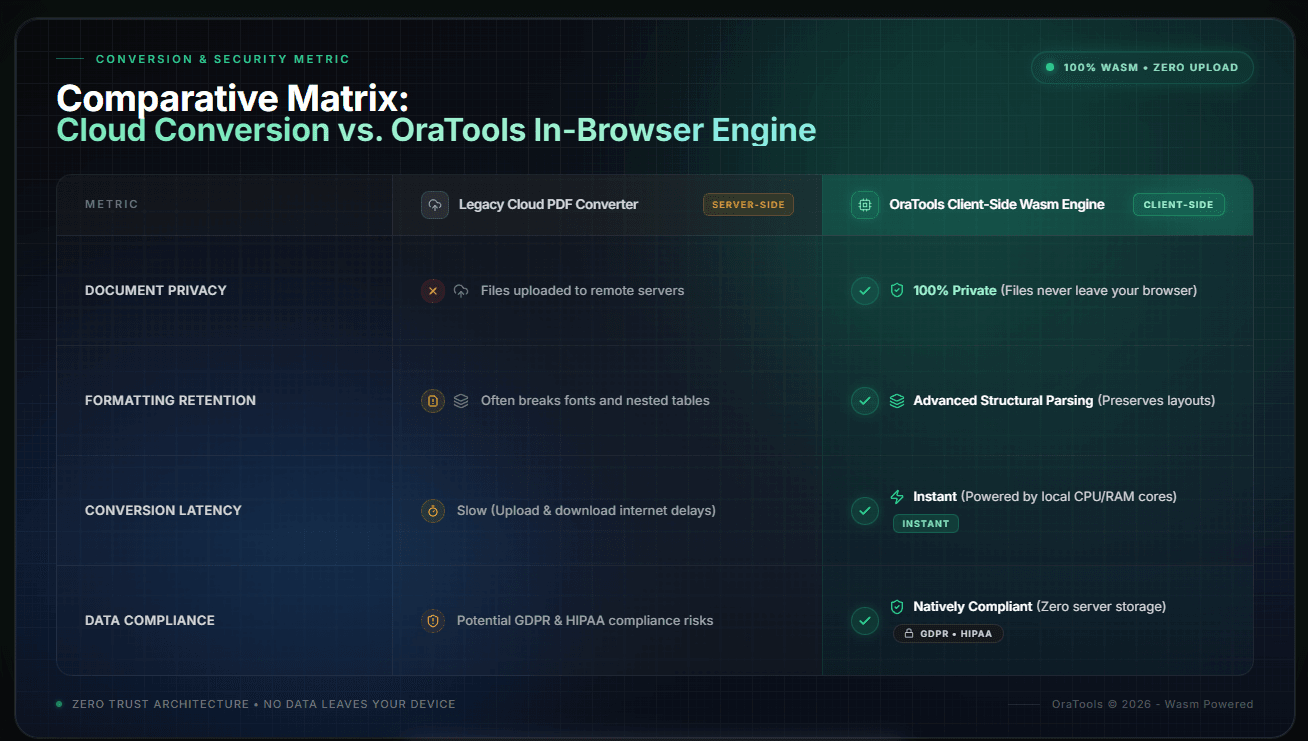
However, using generic online conversion tools often results in broken document layouts, misaligned tables, missing fonts, and corrupted text formatting. Even worse, many free conversion websites require uploading sensitive corporate or personal documents to remote servers, exposing private data to server retention risks, unauthorized logging, or data breaches.
From a Google AdSense quality review perspective, publishing superficial articles that simply say "Use our tool to convert PDF to Word" leads to Low Value Content flags. High-value technical editorial must explain the underlying mechanics: vector graphics parsing, font mapping algorithms, structural DOM reconstruction, and zero-upload client-side processing.
Converting a fixed-layout format (PDF) into a reflowable layout format (Word DOCX) requires complex document structure recognition. Instead of relying on insecure cloud servers, modern web standards utilize WebAssembly (Wasm) to run layout reconstruction engines directly within your browser's local memory.
Platforms like OraTools employ client-side parsing modules that analyze bounding boxes, text baselines, and vector paths locally on your device's hardware (CPU/RAM).
Key Technical Phases of In-Browser PDF-to-Word Conversion:
Text & Font Mapping: The browser extracts embedded glyphs, unicode character maps, and font styles directly from the PDF stream without network transmission.
Structural Layout Recognition: Algorithms group text blocks into paragraphs, reconstruct multi-column layouts, and convert lines into editable table structures.
Local Stream Encoding: The reconstructed document tree is compiled into a native XML-based DOCX file format inside the browser's local sandbox, maintaining complete privacy.

Mastering document conversion is about achieving maximum speed without compromising file integrity or privacy. An all-in-one, privacy-first utility toolkit transforms document management into a seamless routine.
Practical Operational Benefits for Digital Workflows:
Multi-Format Flexibility: Convert PDF to Word, Word to PDF, Image to PDF, or Excel to PDF without jumping between different third-party websites.
Zero Registration Restrictions: Convert, compress, and edit unlimited documents instantly without software installation, account creation, or hidden paywalls.
Universal Cross-Device Compatibility: Works fluidly across desktop, tablet, and mobile browsers, ensuring consistent processing power wherever you work.